back and forth

SELAMAT DATANG TEMAN-TEMAN DI BLOK SAYA
Tampilkan postingan dengan label edit blog supaya syantik. Tampilkan semua postingan

Sabtu, 15 Februari 2020

Cara Memasang Jam di Blog

Cara Memasang Jam di Blog

Time is Money = waktu adalah uang. kali ini ade mau memberi tahu tentang bagaimana memasang jam di blog. agar blog kita mempunyai jam ada banyak cara untuk memasang jam di blog. Ada sebuah situs yang menyediakan berbagai bentuk jam apalagi di situs tersebut kita tinggal mengcopy dan paste kodenya tanpa harus registrasi terlebih dahulu ke situs tersebut situs-situs tersebut sangatlah banyak tetapi yang banyak di pakai adalah :

www.clocklink.com

Berikut cara memasang widget Jam di blogger

  1. Pertama kunjungi www.clocklink.com
  2. lalu klik pada menu Gallery (disitu kita bisa memilih kategori-kategori yang ingin kita pilih)
  3. sebagai contoh kategori analog kita pilih,
  4. kemudian klik view html tag pada kotak di bawah jam yang kita pilih lalu akan timbul halaman baru di window baru. disitu nanti kita ada ketentuan-ketentuan yang memakai bahasa inggris,
  5. langsung aja kita pilih accept
  6. Selanjutnya kita diminta memilih warna (color), {time zone untuk Waktu Indonesia Bagian Barat sebaiknya memilih JOG : Jogyakarta Indonesia Time (GMT + 07.00)} serta jangan lupa tuliskan ukuran (size) jam agar sesuai dengan sidebar tempat meletakan jam itu nantinya. Dapat juga diatur kemudian.
  7. Copy seluruh kode HTML kemudian disimpan di komputer kita contoh pada notepad.
Langkah selanjutnya kita menuju blog kita
  1. Silahkan login ke blogger dengan ID anda
  2. Klik Tata Letak
  3. Klik tab Elemen Halaman
  4. Klik Tambah Gadget
  5. Klik tanda plus (+) untuk HTML/Javascript
  6. Copy paste kode yang kita taruh di notepad tadi ke dalam kolom konten yang tersedia
  7. selesai
SELAMAT MENCOBA :)

Jumat, 14 Februari 2020

edit kusor agar lebi syantik


<style type="text/css">body {cursor:url("http://cursor.com/images/103a.gif

"),default}</style>


<style type="text/css">body {cursor:url("http://cursor.com/images/11a.gif
"),default}</style>

<style type="text/css">body {cursor:url("http://cursor.com/index_12.gif
"),default}</style>


<style type="text/css">body {cursor:url("http://cursor.com/images/199a.gif

"),default}</style>


 <style type="text/css">body {cursor:url("http://cursor.com/images/19a.gif
"),default}</style>


<style type="text/css">body {cursor:url("http://cursor.com/images/6385a.gif
"),default}</style>


<style type="text/css">body {cursor:url("http://cursor.com/images/6459a.gif

"),default}</style>


 <style type="text/css">body {cursor:url("http://cursor.com/index_07.gif

"),default}</style>

SELAMAT MENCOBA

Cara Menambahkan Animasi Kedalam Blog

Cara Menambahkan Animasi Kedalam Blog

  • Klik layout --> add a gadget --> HTML/Java Script
  • Lalu copy pastekan script-script berikut  ini ( sebaiknya jangan di beri judul )
  • Script di bawah ini telah di setting sedimikian rupa agar animasi tersebut ada tepat di pojok kiri bawah blog jika kalian tidak mau animasi tersebut berada di pojok kiri bawah blog kalian .. silakan kalian hapus atau edit kembali script yang berwarna hijau pada contoh di bawah ini setelah gambar animasi ..
Animasi Helikopter Gif

silakan copas :


<div style="position: fixed; bottom: 0px; left: 10px;width:110px;height:130px;"><a href="http://zengbogel.blogspot.com/2011/11/cara-pasang-animasi-lucu-pada-blog.html" target="_blank"><img border="0" src="http://content.sweetim.com/sim/cpie/emoticons/00020389.gif" title="widget animasi lucu bergerak atau gif"  alt="animasi bergerak naruto dan onepiece"/></a><small><center><a href="http://zengbogel.blogspot.com/2011/11/cara-pasang-animasi-lucu-pada-blog.html" target="_blank">animasi bergerak helikopter</a></center></small></div>

setelah itu simpan !!!

     ( angka dapat kalian atur  sesuai dengan kebutuhan)=> untuk mengedit/ mengatur lokasi sesuai kebutuhan misal animasi bergerak ini dapat di

     buat agar tidak ada di pojok/sudut blog . melainkan diam / berada pada  posisi
     yang  kalian ingin kan , jika kalian tertarik untuk mengeditnya .silakan kalian edit   "position : fixed ; bottom:0px;left:10px
position fixed : maksudnya adalah posisi animasi akan selalu bergerak . jika andaingi posisi animasi tersebut hanya diam pada satu posisi maka silakan hapus  position : fixed ini
bottom : 0px : maksud bottom 0px ini adalah jarak antara animasi dengan sisi bawah .
 jika kalian ingin membuat animasi tersebut tidak berada di bawah ,misalkan kalian ingin animasi berada di atas silakan kalian editbottommenjadi topleft : 10px :      maksud left :10px ini adalah jarak antara animasi dengan sisi kiri . jika kalian ingin membuat animasi tersebut tidak berada di kiri,misalkan kalian ingin animasi berada di kanan silakan kalian  editleft menjadi right.

saran ..!!!!
jika anda ingin mengedit animasi menjadi di kanan dan di atas sebaiknya edit saja seperti ini"position : fixed ; top:0px;right:10px"

Berikut beberapa animasi yang bisa kalian coba :

<div style="position: fixed; bottom: 0px; left: 10px;width:130px;height:160px;"><a href="www.zengbogel.blogspot.com" target="_blank"><img border="0" src="http://s.myniceprofile.com/myspacepic/742/th/74214.gif" title="My widget" alt="animasi  bergerak gif" /></a><small><center><a href="http://zengbogel.blogspot.com/2011/12/download-game.htmll" target="_blank">My Widget</a></center></small></div>


Froggy-cute
<div style="position: fixed; bottom: 0px; left: 10px;width:130px;height:160px;"><a href="www.zengbogel.blogspot.com" target="_blank"><img border="0" src="http://s.myniceprofile.com/myspacepic/466/th/46606.gif" title="My widget" alt="animasi  bergerak gif" /></a><small><center><a href="http://zengbogel.blogspot.com/2011/12/download-game.htmll" target="_blank">My Widget</a></center></small></div>


Green Skull
<div style="position: fixed; bottom: 0px; left: 10px;width:130px;height:160px;"><a href="www.zengbogel.blogspot.com" target="_blank"><img border="0" src="http://s.myniceprofile.com/myspacepic/1/th/152.gif" title="My widget" alt="animasi  bergerak gif" /></a><small><center><a href="http://zengbogel.blogspot.com/2011/12/download-game.htmll" target="_blank">My Widget</a></center></small></div>


animated
<div style="position: fixed; bottom: 0px; left: 10px;width:130px;height:160px;"><a href="www.zengbogel.blogspot.com" target="_blank"><img border="0" src="http://s.myniceprofile.com/myspacepic/198/th/19809.gif" title="My widget" alt="animasi  bergerak gif" /></a><small><center><a href="http://zengbogel.blogspot.com/2011/12/download-game.htmll" target="_blank">My Widget</a></center></small></div>


Dancing Spider-Man
<div style="position: fixed; bottom: 0px; left: 10px;width:130px;height:160px;"><a href="www.zengbogel.blogspot.com" target="_blank"><img border="0" src="http://s.myniceprofile.com/myspacepic/3/th/312.gif" title="My widget" alt="animasi  bergerak gif" /></a><small><center><a href="http://zengbogel.blogspot.com/2011/12/download-game.htmll" target="_blank">My Widget</a></center></small></div>


Anime Myspace Comments
<div style="position: fixed; bottom: 0px; left: 10px;width:130px;height:160px;"><a href="www.zengbogel.blogspot.com" target="_blank"><img border="0" src="http://i.mnpls.com/715/71510.gif" title="My widget" alt="animasi  bergerak gif" /></a><small><center><a href="http://zengbogel.blogspot.com/2011/12/download-game.htmll" target="_blank">My Widget</a></center></small></div>


Animated Fight
<div style="position: fixed; bottom: 0px; left: 10px;width:130px;height:160px;"><a href="www.zengbogel.blogspot.com" target="_blank"><img border="0" src="http://s.myniceprofile.com/myspacepic/59/th/5990.gif" title="My widget" alt="animasi  bergerak gif" /></a><small><center><a href="http://zengbogel.blogspot.com/2011/12/download-game.htmll" target="_blank">My Widget</a></center></small></div>


Dancing Pig
<div style="position: fixed; bottom: 0px; left: 10px;width:130px;height:160px;"><a href="www.zengbogel.blogspot.com" target="_blank"><img border="0" src="http://s.myniceprofile.com/myspacepic/110/th/11046.gif" title="My widget" alt="animasi  bergerak gif" /></a><small><center><a href="http://zengbogel.blogspot.com/2011/12/download-game.htmll" target="_blank">My Widget</a></center></small></div>


Playing
<div style="position: fixed; bottom: 0px; left: 10px;width:130px;height:160px;"><a href="www.zengbogel.blogspot.com" target="_blank"><img border="0" src="http://s.myniceprofile.com/myspacepic/0/th/72.gif" title="My widget" alt="animasi  bergerak gif" /></a><small><center><a href="http://zengbogel.blogspot.com/2011/12/download-game.htmll" target="_blank">My Widget</a></center></small></div>


1
<div style="position: fixed; bottom: 0px; left: 10px;width:130px;height:160px;"><a href="www.zengbogel.blogspot.com" target="_blank"><img border="0" src="http://s.myniceprofile.com/myspacepic/229/th/22949.gif" title="My widget" alt="animasi  bergerak gif" /></a><small><center><a href="http://zengbogel.blogspot.com/2011/12/download-game.htmll" target="_blank">My Widget</a></center></small></div>


Stick Figures Cartoon
<div style="position: fixed; bottom: 0px; left: 10px;width:130px;height:160px;"><a href="www.zengbogel.blogspot.com" target="_blank"><img border="0" src="http://s.myniceprofile.com/myspacepic/2/th/257.gif" title="My widget" alt="animasi  bergerak gif" /></a><small><center><a href="http://zengbogel.blogspot.com/2011/12/download-game.htmll" target="_blank">My Widget</a></center></small></div>


Loading
<div style="position: fixed; bottom: 0px; left: 10px;width:130px;height:160px;"><a href="www.zengbogel.blogspot.com" target="_blank"><img border="0" src="http://s.myniceprofile.com/myspacepic/740/th/74084.gif" title="My widget" alt="animasi  bergerak gif" /></a><small><center><a href="http://zengbogel.blogspot.com/2011/12/download-game.htmll" target="_blank">My Widget</a></center></small></div>


animated
<div style="position: fixed; bottom: 0px; left: 10px;width:130px;height:160px;"><a href="www.zengbogel.blogspot.com" target="_blank"><img border="0" src="http://s.myniceprofile.com/myspacepic/197/th/19769.gif" title="My widget" alt="animasi  bergerak gif" /></a><small><center><a href="http://zengbogel.blogspot.com/2011/12/download-game.htmll" target="_blank">My Widget</a></center></small></div>


animated
<div style="position: fixed; bottom: 0px; left: 10px;width:130px;height:160px;"><a href="www.zengbogel.blogspot.com" target="_blank"><img border="0" src="http://s.myniceprofile.com/myspacepic/458/th/45845.gif" title="My widget" alt="animasi  bergerak gif" /></a><small><center><a href="http://zengbogel.blogspot.com/2011/12/download-game.htmll" target="_blank">My Widget</a></center></small></div>


Dance
<div style="position: fixed; bottom: 0px; left: 10px;width:130px;height:160px;"><a href="www.zengbogel.blogspot.com" target="_blank"><img border="0" src="http://s.myniceprofile.com/myspacepic/2/th/219.gif" title="My widget" alt="animasi  bergerak gif" /></a><small><center><a href="http://zengbogel.blogspot.com/2011/12/download-game.htmll" target="_blank">My Widget</a></center></small></div>


Doraemon
<div style="position: fixed; bottom: 0px; left: 10px;width:130px;height:160px;"><a href="www.zengbogel.blogspot.com" target="_blank"><img border="0" src="http://s.myniceprofile.com/myspacepic/1031/th/103123.gif" title="My widget" alt="animasi  bergerak gif" /></a><small><center><a href="http://zengbogel.blogspot.com/2011/12/download-game.htmll" target="_blank">My Widget</a></center></small></div>


Yellow Bird
<div style="position: fixed; bottom: 0px; left: 10px;width:130px;height:160px;"><a href="www.zengbogel.blogspot.com" target="_blank"><img border="0" src="http://s.myniceprofile.com/myspacepic/439/th/43917.gif" title="My widget" alt="animasi  bergerak gif" /></a><small><center><a href="http://zengbogel.blogspot.com/2011/12/download-game.htmll" target="_blank">My Widget</a></center></small></div>


Brains
<div style="position: fixed; bottom: 0px; left: 10px;width:130px;height:160px;"><a href="www.zengbogel.blogspot.com" target="_blank"><img border="0" src="http://s.myniceprofile.com/myspacepic/466/th/46602.gif" title="My widget" alt="animasi  bergerak gif" /></a><small><center><a href="http://zengbogel.blogspot.com/2011/12/download-game.htmll" target="_blank">My Widget</a></center></small></div>


Dancing Spongebob
<div style="position: fixed; bottom: 0px; left: 10px;width:130px;height:160px;"><a href="www.zengbogel.blogspot.com" target="_blank"><img border="0" src="http://s.myniceprofile.com/myspacepic/1028/th/102882.gif" title="My widget" alt="animasi  bergerak gif" /></a><small><center><a href="http://zengbogel.blogspot.com/2011/12/download-game.htmll" target="_blank">My Widget</a></center></small></div>


Piglet disney
<div style="position: fixed; bottom: 0px; left: 10px;width:130px;height:160px;"><a href="www.zengbogel.blogspot.com" target="_blank"><img border="0" src="http://s.myniceprofile.com/myspacepic/438/th/43833.gif" title="My widget" alt="animasi  bergerak gif" /></a><small><center><a href="http://zengbogel.blogspot.com/2011/12/download-game.htmll" target="_blank">My Widget</a></center></small></div>


Disney
<div style="position: fixed; bottom: 0px; left: 10px;width:130px;height:160px;"><a href="www.zengbogel.blogspot.com" target="_blank"><img border="0" src="http://s.myniceprofile.com/myspacepic/485/th/48554.gif" title="My widget" alt="animasi  bergerak gif" /></a><small><center><a href="http://zengbogel.blogspot.com/2011/12/download-game.htmll" target="_blank">My Widget</a></center></small></div>


Hello Panda
<div style="position: fixed; bottom: 0px; left: 10px;width:130px;height:160px;"><a href="www.zengbogel.blogspot.com" target="_blank"><img border="0" src="http://s.myniceprofile.com/myspacepic/212/th/21215.gif" title="My widget" alt="animasi  bergerak gif" /></a><small><center><a href="http://zengbogel.blogspot.com/2011/12/download-game.htmll" target="_blank">My Widget</a></center></small></div>

Hi Friend
<div style="position: fixed; bottom: 0px; left: 10px;width:130px;height:160px;"><a href="www.zengbogel.blogspot.com" target="_blank"><img border="0" src="http://s.myniceprofile.com/myspacepic/243/th/24365.gif" title="My widget" alt="animasi  bergerak gif" /></a><small><center><a href="http://zengbogel.blogspot.com/2011/12/download-game.htmll" target="_blank">My Widget</a></center></small></div>

Funny Star
<div style="position: fixed; bottom: 0px; left: 10px;width:130px;height:160px;"><a href="www.zengbogel.blogspot.com" target="_blank"><img border="0" src="http://s.myniceprofile.com/myspacepic/102/th/10221.gif" title="My widget" alt="animasi  bergerak gif" /></a><small><center><a href="http://zengbogel.blogspot.com/2011/12/download-game.htmll" target="_blank">My Widget</a></center></small></div>

hey!
<div style="position: fixed; bottom: 0px; left: 10px;width:130px;height:160px;"><a href="www.zengbogel.blogspot.com" target="_blank"><img border="0" src="http://s.myniceprofile.com/myspacepic/539/th/53966.gif" title="My widget" alt="animasi  bergerak gif" /></a><small><center><a href="http://zengbogel.blogspot.com/2011/12/download-game.htmll" target="_blank">My Widget</a></center></small></div>

Hi
<div style="position: fixed; bottom: 0px; left: 10px;width:130px;height:160px;"><a href="www.zengbogel.blogspot.com" target="_blank"><img border="0" src="http://s.myniceprofile.com/myspacepic/102/th/10235.gif" title="My widget" alt="animasi  bergerak gif" /></a><small><center><a href="http://zengbogel.blogspot.com/2011/12/download-game.htmll" target="_blank">My Widget</a></center></small></div>

Hello Small Girl
<div style="position: fixed; bottom: 0px; left: 10px;width:130px;height:160px;"><a href="www.zengbogel.blogspot.com" target="_blank"><img border="0" src="http://s.myniceprofile.com/myspacepic/228/th/22801.gif" title="My widget" alt="animasi  bergerak gif" /></a><small><center><a href="http://zengbogel.blogspot.com/2011/12/download-game.htmll" target="_blank">My Widget</a></center></small></div>

naruto and his mother with his father
<div style="position: fixed; bottom: 0px; left: 10px;width:130px;height:160px;"><a href="www.zengbogel.blogspot.com" target="_blank"><img border="0" src="http://s.myniceprofile.com/myspacepic/460/th/46008.jpg" title="My widget" alt="animasi  bergerak gif" /></a><small><center><a href="http://zengbogel.blogspot.com/2011/12/download-game.htmll" target="_blank">My Widget</a></center></small></div>

Mangekyou Sharingan
<div style="position: fixed; bottom: 0px; left: 10px;width:130px;height:160px;"><a href="www.zengbogel.blogspot.com" target="_blank"><img border="0" src="http://s.myniceprofile.com/myspacepic/712/th/71266.gif" title="My widget" alt="animasi  bergerak gif" /></a><small><center><a href="http://zengbogel.blogspot.com/2011/12/download-game.htmll" target="_blank">My Widget</a></center></small></div>


Chibi\'s!
<div style="position: fixed; bottom: 0px; left: 10px;width:130px;height:160px;"><a href="www.zengbogel.blogspot.com" target="_blank"><img border="0" src="http://s.myniceprofile.com/myspacepic/656/th/65649.gif" title="My widget" alt="animasi  bergerak gif" /></a><small><center><a href="http://zengbogel.blogspot.com/2011/12/download-game.htmll" target="_blank">My Widget</a></center></small></div>

shippuuden sasuke
<div style="position: fixed; bottom: 0px; left: 10px;width:130px;height:160px;"><a href="www.zengbogel.blogspot.com" target="_blank"><img border="0" src="http://s.myniceprofile.com/myspacepic/539/th/53972.gif" title="My widget" alt="animasi  bergerak gif" /></a><small><center><a href="http://zengbogel.blogspot.com/2011/12/download-game.htmll" target="_blank">My Widget</a></center></small></div>

anime girl
<div style="position: fixed; bottom: 0px; left: 10px;width:130px;height:160px;"><a href="www.zengbogel.blogspot.com" target="_blank"><img border="0" src="http://s.myniceprofile.com/myspacepic/461/th/46105.jpg" title="My widget" alt="animasi  bergerak gif" /></a><small><center><a href="http://zengbogel.blogspot.com/2011/12/download-game.htmll" target="_blank">My Widget</a></center></small></div>

Naruto hot
<div style="position: fixed; bottom: 0px; left: 10px;width:130px;height:160px;"><a href="www.zengbogel.blogspot.com" target="_blank"><img border="0" src="http://s.myniceprofile.com/myspacepic/471/th/47146.jpg" title="My widget" alt="animasi  bergerak gif" /></a><small><center><a href="http://zengbogel.blogspot.com/2011/12/download-game.htmll" target="_blank">My Widget</a></center></small></div>

Naruto shippuden kyubbi naruto
<div style="position: fixed; bottom: 0px; left: 10px;width:130px;height:160px;"><a href="www.zengbogel.blogspot.com" target="_blank"><img border="0" src="http://s.myniceprofile.com/myspacepic/692/th/69207.gif" title="My widget" alt="animasi  bergerak gif" /></a><small><center><a href="http://zengbogel.blogspot.com/2011/12/download-game.htmll" target="_blank">My Widget</a></center></small></div>

kazekage gaara
<div style="position: fixed; bottom: 0px; left: 10px;width:130px;height:160px;"><a href="www.zengbogel.blogspot.com" target="_blank"><img border="0" src="http://s.myniceprofile.com/myspacepic/539/th/53973.gif" title="My widget" alt="animasi  bergerak gif" /></a><small><center><a href="http://zengbogel.blogspot.com/2011/12/download-game.htmll" target="_blank">My Widget</a></center></small></div>

f32
<div style="position: fixed; bottom: 0px; left: 10px;width:130px;height:160px;"><a href="www.zengbogel.blogspot.com" target="_blank"><img border="0" src="http://sig.graphicsfactory.com/Halloween/a.gif" title="My widget" alt="animasi  bergerak gif" /></a><small><center><a href="http://zengbogel.blogspot.com/2011/12/download-game.htmll" target="_blank">My Widget</a></c
enter></small></div>


SELAMAT MENCOBA :)

Cara Membuat Tulisan Berjalan di HTML

Cara Membuat Tulisan Berjalan di HTML

Cara Membuat Tulisan Berjalan di HTML

HTML menyediakan elemen khusus yang disebut dengan marquee. Untuk lebih jelasnya, mari simak penjelasan cara membuat tulisan di HTML dibawah ini :

1. Elemen marquee

Elemen marquee digunakan untuk membuat teks atau media lain (seperti gambar atau video) bergerak baik secara horizontal maupun vertikal. Saat ini beberapa browser sudah tidak lagi mendukung elemen marquee sehingga elemen ini jarang digunakan.
Dibandingkan menggunakan marquee, Anda lebih dianjurkan menggunakan Javascript dan CSS. Tetapi pada materi kali ini kita akan membahas tentang penggunaan HTML marquee.
Untuk dapat membuat teks berjalan, Anda dapat menggunakan pasangan tag <marquee>Isi teks disini</marquee>. Pada tag <marquee> juga terdapat beberapa atribut seperti :

2. Atribut width dan height

Atribut width digunakan untuk menentukan ukuran lebar dari elemen marquee dengan nilai angka yang dapat ditulis seperti 18, 15% atau 30px. Sedangkan, atribut height digunakan untuk menentukan ukuran tinggi dari elemen marquee dengan nilai angka yang sama seperti width, yaitu 18, 15% atau 30px.
Berikut contoh kode penulisan width dan height di HTML :
<!DOCTYPE html>
 <html>
 <head>
  <title>Atribut Width dan Height di Tag Marquee</title>
 </head>
 <body>
  <marquee width="500" height="40">Teks ini berjalan</marquee>
 </body>
 </html>
Setelah Anda menjalankan kode diatas di browser maka akan tampil seperti gambar dibawah ini:
atribut width dan height pada marquee
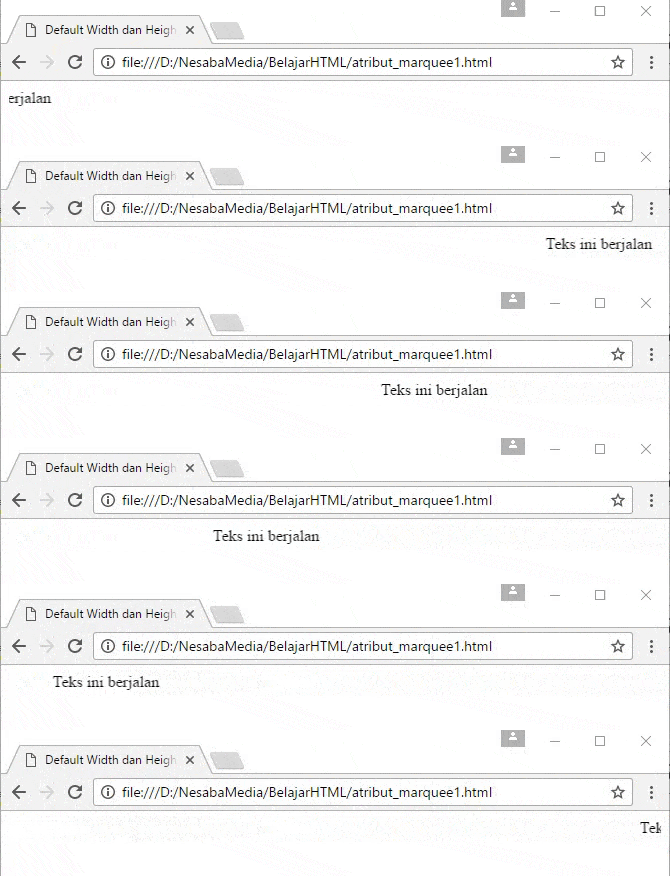
Jika Anda tidak memberikan pengaturan untuk width dan height maka width-nya secara default 100% (lebar penuh jendela browser) dan height-nya menyesuaikan dengan ukuran tinggi kontennya.
Berikut contoh kode penulisannya di HTML :
<!DOCTYPE html>
<html>
 <head>
  <title>Default Width dan Height di Tag Marquee</title>
 </head>
 <body>
  <marquee>Teks ini berjalan</marquee>
 </body>
</html>
Setelah Anda menjalankan kode HTML diatas, maka akan tampil seperti gambar dibawah ini:
tanpa atribut width dan height pada marquee
3. Atribut direction

Atribut direction digunakan untuk menentukan arah gerak dari konten yang berada di dalam tag marquee. Dimana terdapat empat nilai di dalam atribut ini yaitu up (atas), down (bawah), left (kiri) dan right (kanan).
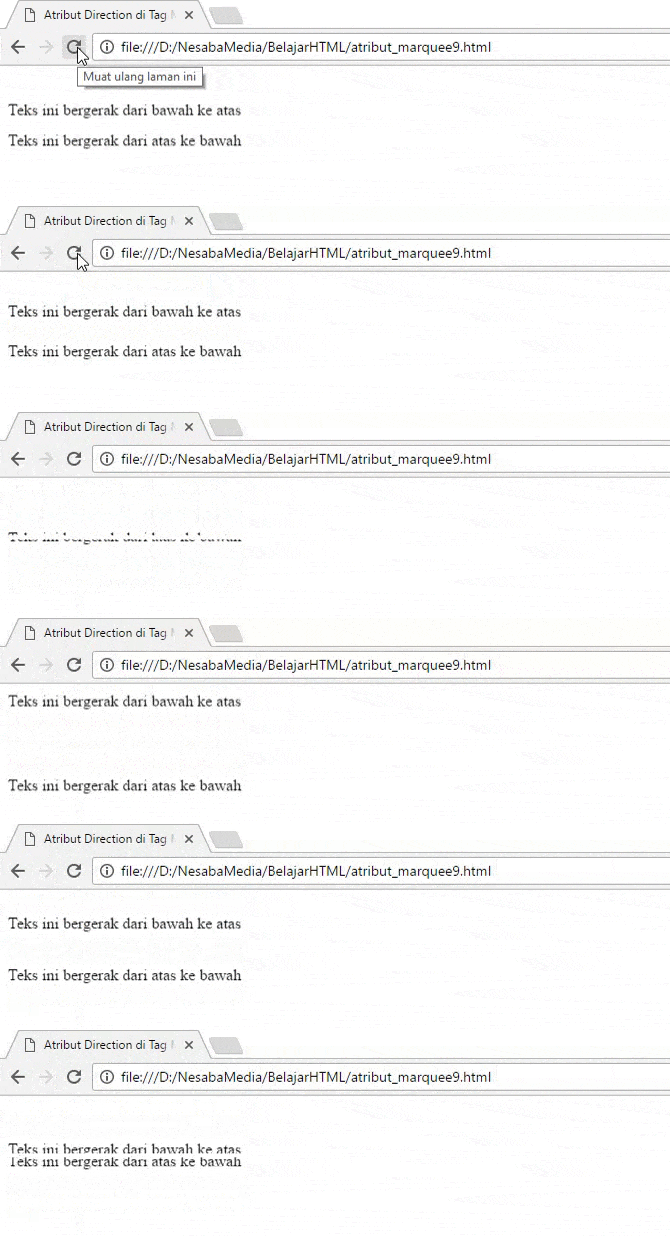
Secara default jika kita menggunakan nilai “left” maka teks akan berjalan dari kanan ke sisi kiri dan begitu pula dengan nilai “right” maka teks akan berjalan dari kiri ke sisi kanan. Kemudian, untuk “up” akan bergerak dari bawah ke atas sedangkan “down” akan bergerak dari atas ke bawah. Berikut contoh code penulisan dan penggunaannya di HTML :
<!DOCTYPE html>
<html>
 <head>
  <title>Atribut Direction di Tag Marquee</title>
 </head>
 <body>
  <marquee direction="right">Teks ini ke kanan</marquee>
  <marquee direction="left">Teks ini ke kiri</marquee>
 </body>
</html>
Setelah Anda menjalankan kode HTML diatas, maka akan tampil seperti gambar dibawah ini:
penggunaan atribut direction
Dibawah ini contoh lain penggunaan atribut direction (up dan down) :
<!DOCTYPE html>
 <html>
 <head>
  <title>Atribut Direction di Tag Marquee</title>
 </head>
 <body>
  <marquee direction="up" height="50">Teks ini bergerak dari bawah ke atas</marquee><br>
  <marquee direction="down" height="50">Teks ini bergerak dari atas ke bawah</marquee>
 </body>
 </html>
Setelah Anda menjalankan kode HTML diatas, maka akan tampil seperti gambar dibawah ini:
penggunaan direction up down

4. Atribut behavior

Atribut behavior digunakan untuk menentukan tipe pergerakan marquee. Nilai yang dapat diisi di atribut behavior yaitu slide, scroll ataupun alternate. Jika Anda tidak membuat atribut behavior di tag <marquee> maka secara default nilainya adalah “scroll”.
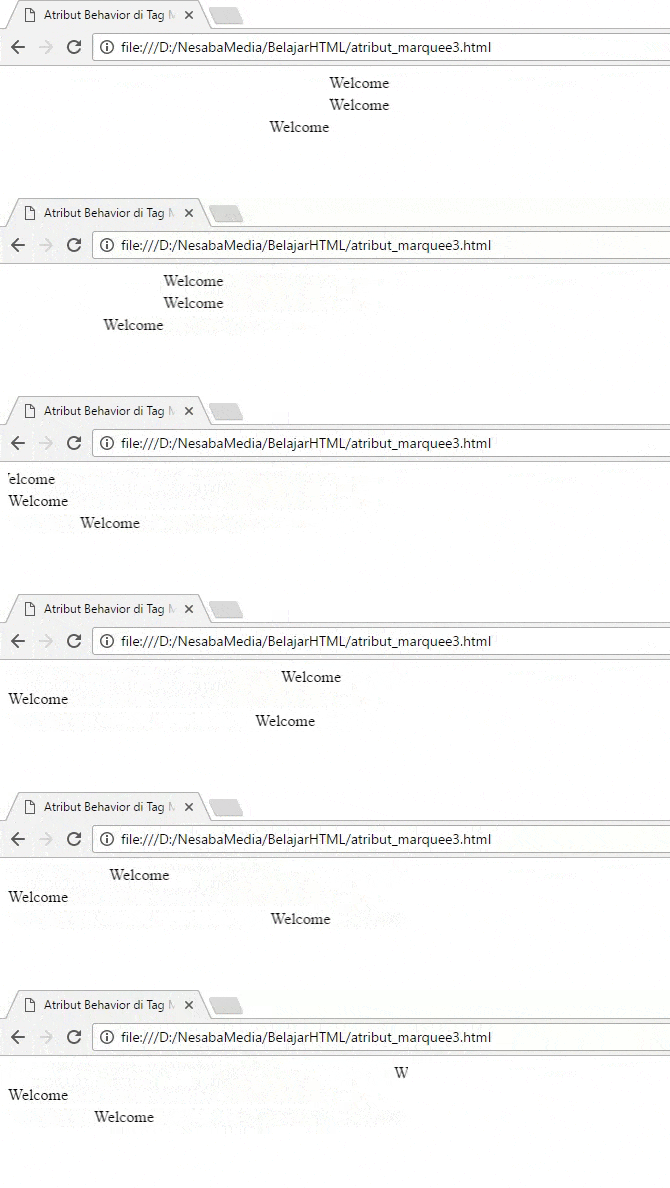
Scroll artinya konten bergerak ke sisi yang satu dan muncul kembali dari sisi yang berlawanan. Kemudian, slide artinya konten bergerak menuju ke satu sisi dan ketika sampai di sisi tersebut konten tersebut diam (berhenti bergerak). Sedangkan, alternate artinya konten bergerak menuju ke satu sisi kemudian kembali lagi ke sisi yang berlawan seperti terpantul.
Berikut contoh kode HTMLnya :
<!DOCTYPE html>
<html>
 <head>
  <title>Atribut Behavior di Tag Marquee</title>
 </head>
 <body>
  <marquee behavior="scroll" width="400">Welcome</marquee><br>
  <marquee behavior="slide" width="400">Welcome</marquee><br>
  <marquee behavior="alternate" width="400">Welcome</marquee><br>
 </body>
</html>
Setelah Anda menjalankan kode diatas, maka di browser akan tampil seperti gambar dibawah ini:
penggunaan atribut behavior di marquee

5. Atribut scrolldelay

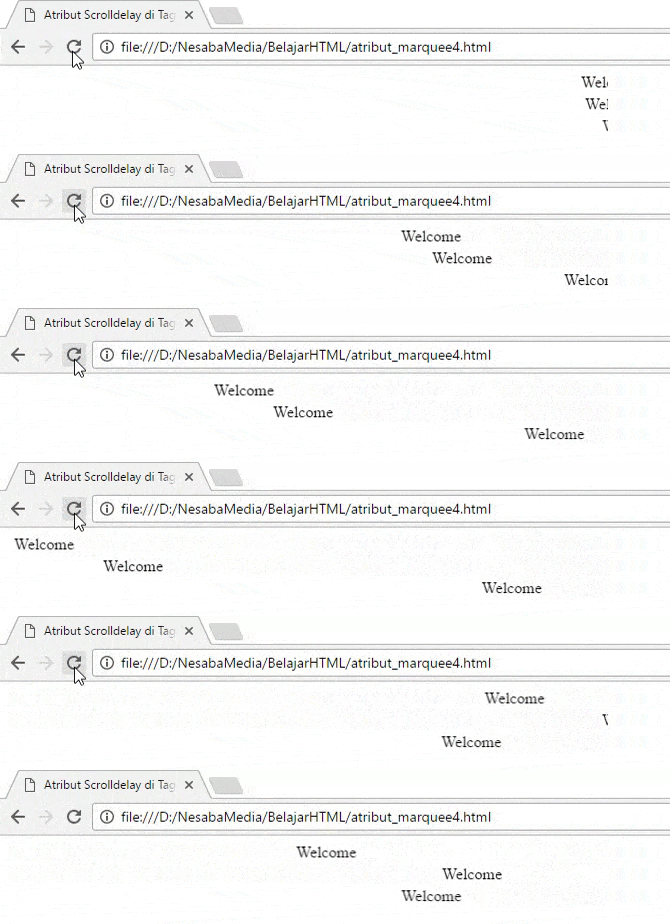
Atribut scrolldelay digunakan untuk menentukan waktu delay (tunda) per langkah dalam satuan milisekon ( 1 milisekon = 1/1000 sekon) yang diisi dengan nilai angka seperti 100. Dimana nilai default –nya adalah 85.
Berikut contoh penulisannya di HTML :
<!DOCTYPE html>
<html>
 <head>
  <title>Atribut Scrolldelay di Tag Marquee</title>
 </head>
 <body>
  <marquee width="600">Welcome</marquee><br>
  <marquee scrolldelay="100" width="600">Welcome</marquee><br>
  <marquee scrolldelay="400" width="600">Welcome</marquee>
 </body>
</html>
Setelah Anda menjalankan kode HTML diatas di, maka di browser akan tampil seperti gambar dibawah ini:
penggunaan scrolldelay pada marquee

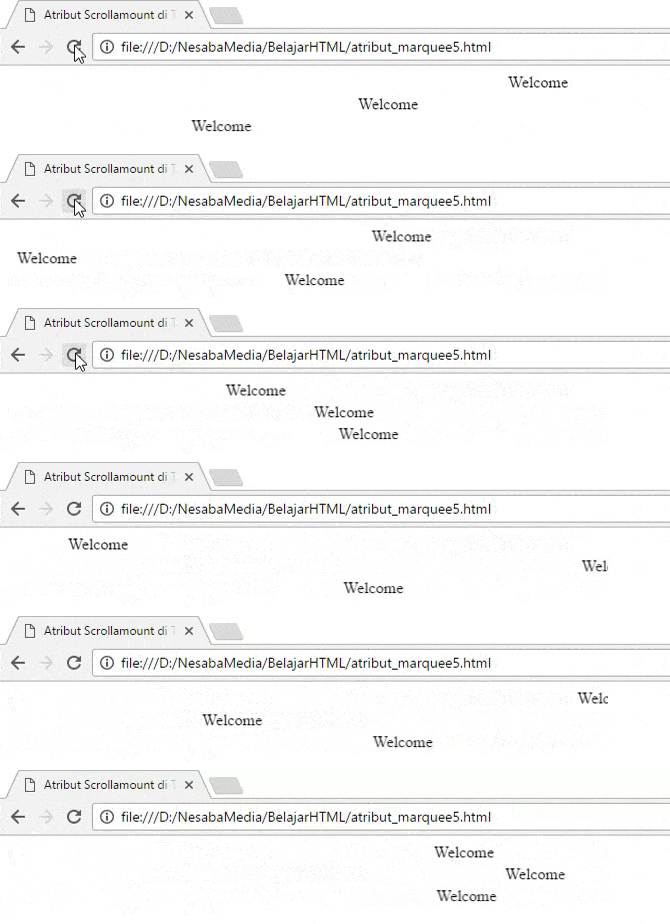
6. Atribut scrollamount

Atribut scrollamount digunakan untuk menentukan kecepatan konten di tag <marquee> dalam bergerak dengan satuan pixel. Dimana nilai default-nya adalah 6. Berikut contoh penulisan kode HTMLnya :
<!DOCTYPE html>
<html>
 <head>
  <title>Atribut Scrollamount di Tag Marquee</title>
 </head>
 <body>
  <marquee width="600">Welcome</marquee><br>
  <marquee scrollamount="15" width="600">Welcome</marquee><br>
  <marquee scrollamount="25" width="600">Welcome</marquee>
 </body>
</html>
penggunaan scrollamount pada marquee

7. Atribut bgcolor

Atribut bgcolor digunakan untuk menentukan warna background (latar belakang) pada elemenmarquee. Nilai atribut bgcolor bisa ditulis dengan nama warna (misal:cyan) atau dalam kode hex (#469A9A). Dibawah ini contoh kode HTMLnya :
<!DOCTYPE html>
<html>
 <head>
  <title>Atribut BGColor di Tag Marquee</title>
 </head>
 <body>
  <marquee bgcolor="cyan" width="400">Welcome</marquee>
 </body>
</html>
Tampilan di browser akan seperti ini:
penggunaan atribut bgcolor pada marquee

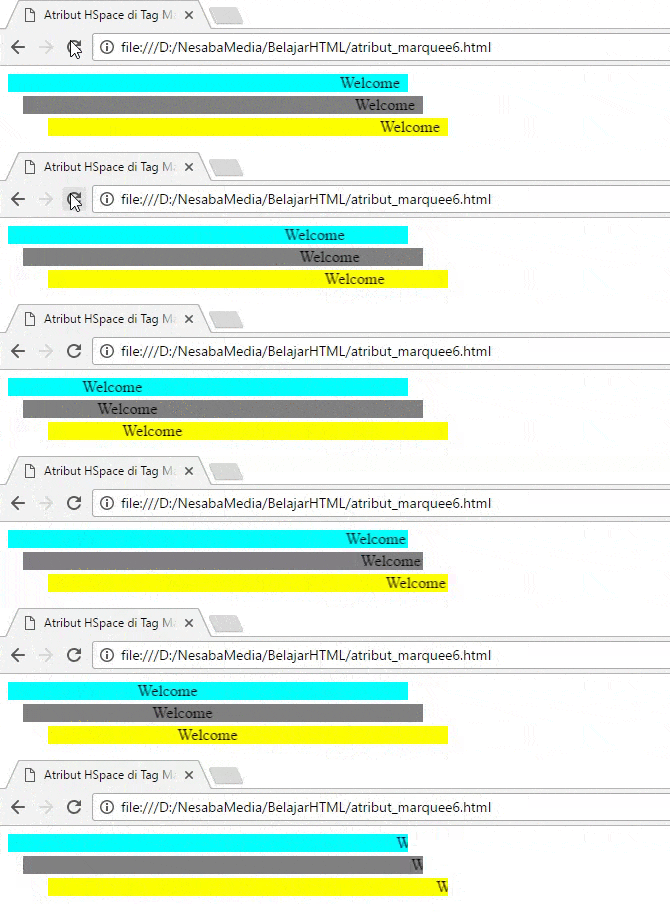
8. Atribut HSpace

Atribut HSpace digunakan untuk menentukan ruang kosong (space) yang horizontal pada kiri dan kanan marquee. Biasanya diisi dengan nilai yang berupa angka seperti 20, 15% atau 40px. Agar lebih jelas, simak contoh kode HTMLnya dibawah ini
<!DOCTYPE html>
<html>
 <head>
  <title>Atribut HSpace di Tag Marquee</title>
 </head>
 <body>
  <marquee bgcolor="cyan" width="400">Welcome</marquee><br>
  <marquee hspace="15" bgcolor="grey" width="400">Welcome</marquee><br>
  <marquee hspace="40" bgcolor="yellow" width="400">Welcome</marquee>
 </body>
</html>
Ketika kode HTML diatas dijalankan, maka tampilannya akan seperti ini:
Penggunaan atribut HSpace pada marquee

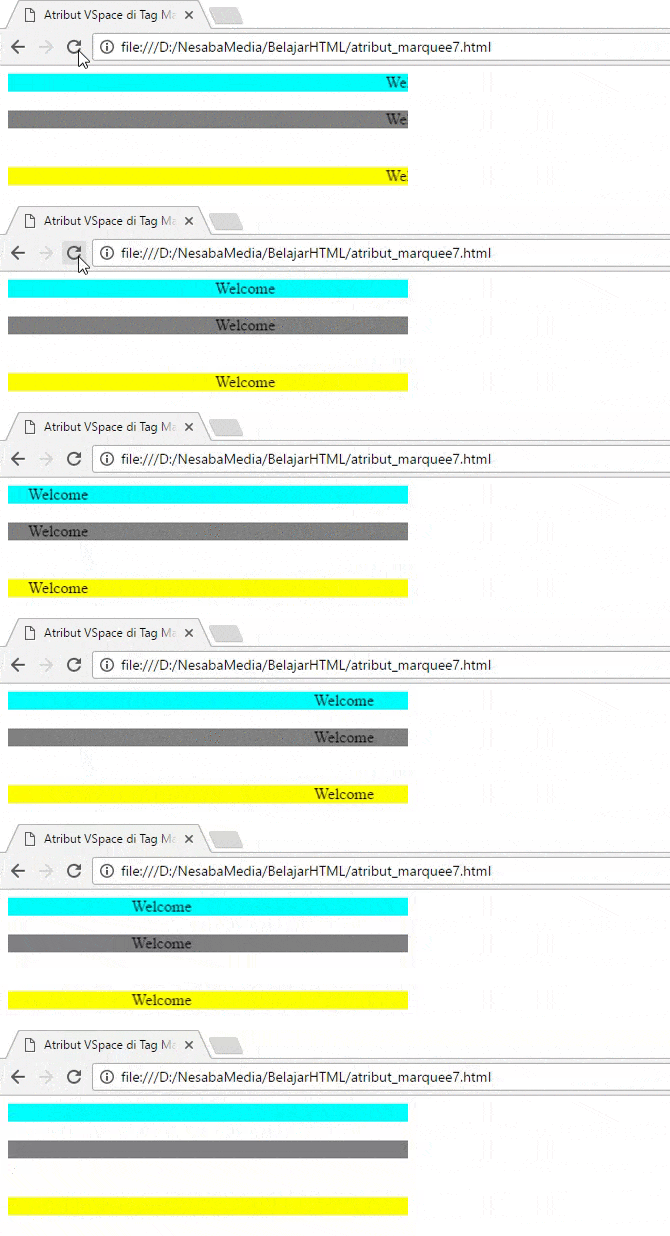
9. Atribut VSpace

Atribut VSpace digunakan untuk menentukan ruang kosong (space) yang vertikal pada atas dan bawah marquee. Biasanya diisi dengan nilai yang berupa angka seperti 20, 15% atau 40px. Contoh penulisan atribut ini bisa Anda lihat dibawah:
<!DOCTYPE html>
<html>
 <head>
  <title>Atribut VSpace di Tag Marquee</title>
 </head>
 <body>
  <marquee bgcolor="cyan" width="400">Welcome</marquee><br>
  <marquee vspace="15" bgcolor="grey" width="400">Welcome</marquee><br>
  <marquee vspace="20" bgcolor="yellow" width="400">Welcome</marquee>
 </body>
</html>
Setelah Anda menjalankan kode diatas, maka di browser akan tampil seperti gambar dibawah ini:
Penggunaan atribut VSpace pada marquee

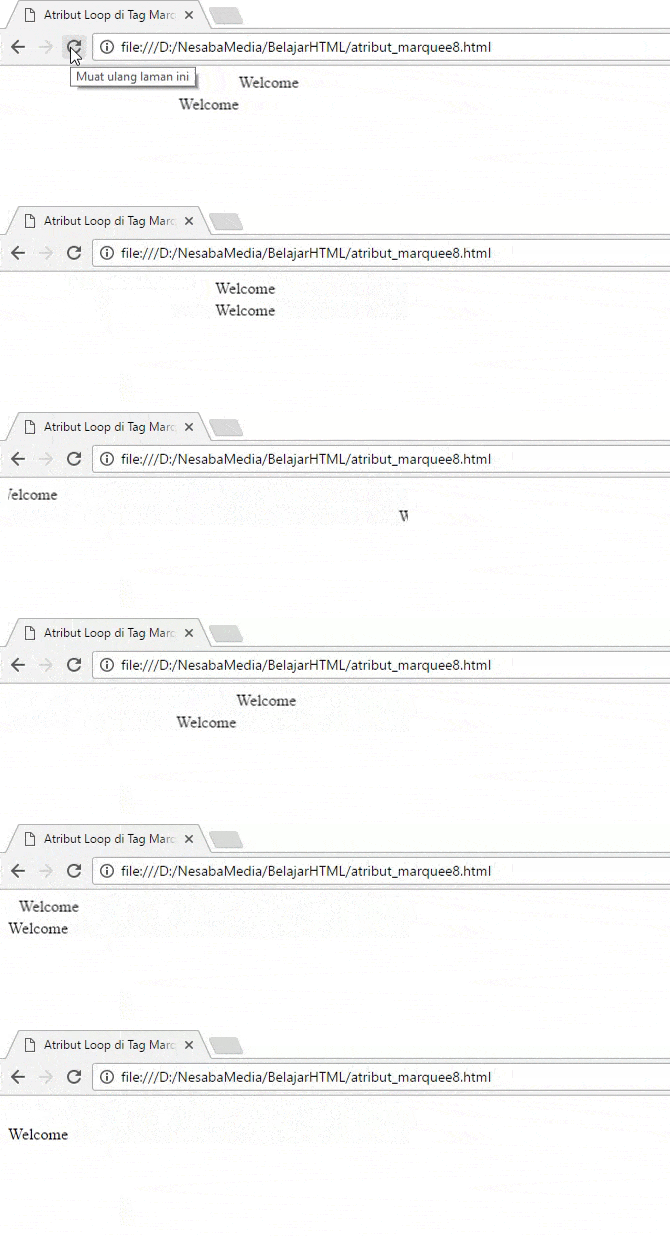
10. Atribut loop

Atribut loop digunakan untuk menentukan berapa kali konten marquee berulang dengan nilai defaultnya adalah tak terbatas. Berikut contoh HTMLnya :
<!DOCTYPE html>
<html>
 <head>
  <title>Atribut Loop di Tag Marquee</title>
 </head>
 <body>
  <marquee loop="2" width="400">Welcome</marquee><br>
  <marquee loop="2" behavior="slide" width="400">Welcome</marquee>
 </body>
</html>
Setelah Anda menjalankannya di browser, maka akan tampil seperti gambar dibawah ini:
penggunaan atribut loop

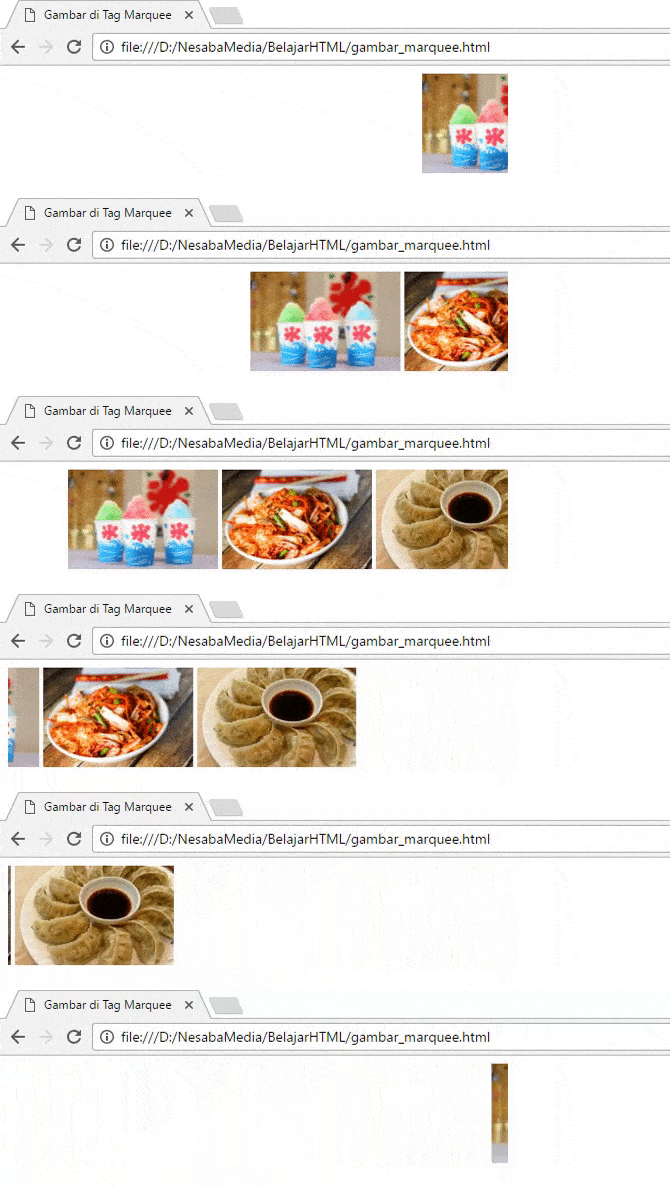
11. Penggunaan tag <marquee> pada gambar

Tag <marquee> dapat diterapkan tidak hanya pada teks tetapi juga pada gambar. Anda cukup meletakkan source gambar di antara pasangan tag <marquee>. Berikut contoh penulisan kode HTMLnya :
<!DOCTYPE html>
<html>
 <head>
  <title>Gambar di Tag Marquee</title>
 </head>
 <body>
  <marquee width="500"><img src="kakigori.jpg" height="100"> <img src="Kimchi.jpg" height="100">
  <img src="mandu.jpg" height="100"></marquee>
 </body>
</html>
Setelah Anda menjalankannya di browser, maka akan tampil seperti gambar dibawah ini:
gambar pada marquee